FrameAssembly v3.1.2 · Open-Source Solo Project · .frasm <-> .pcap

A language to create and change PCAP

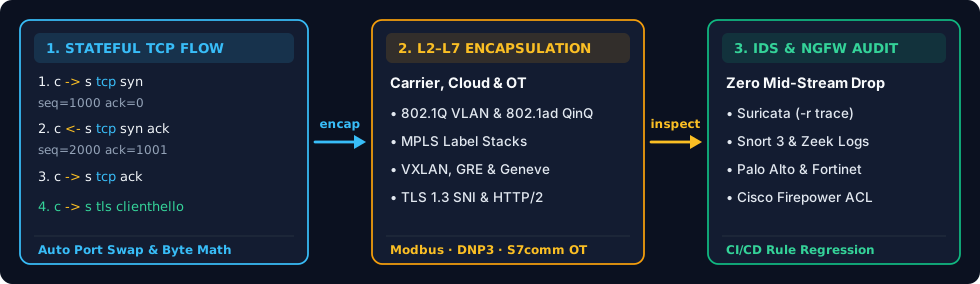
Write a few lines of plain text and compile them into a .pcap. Or take an existing capture, run reverse to turn it into editable text, change whatever IPs, VLANs, or payloads you want, and compile it back.

Despite the name, there are no loops, variables, or CPU registers here — one line is just one Ethernet frame for Wireshark, Suricata, or tcpreplay.

Built in Rust by a solo developer under the MIT License. Runs right inside this browser tab via WebAssembly, or offline as a single CLI binary.

81 L2–L7 protocols · Two-way .frasm <-> .pcap · Zero sudoCursed Packets Cookbook ->
vlan20_tls.frasm
Try changing vlan 20 -> vlan 99 or dstport 443 -> 8443 right here:5 frames ready
#10msTCP62B[VLAN 20] 49152 -> 443 [SYN] Seq=1000Ln 7
#21msTCP62B[VLAN 20] 443 -> 49152 [SYN, ACK] Seq=1000 Ack=1001Ln 8
#32msTCP58B[VLAN 20] 49152 -> 443 [ACK] Seq=1001 Ack=1001Ln 9
#43msTLS129B[VLAN 20] ClientHello SNI="portal.lab"Ln 10
#513msTLS112B[VLAN 20] ServerHello Cipher=0x1301Ln 11
1 · host { ... }

Name your boxes once at the top

Give each endpoint an IPv4, IPv6, or MAC-only switch address (colons, hyphens, or Cisco 001a.2b3c.4d5e all work).

2 · compile { a -> b }

Draw the packet ladder, one frame per line

Write vlan 20, tcp syn, snmp3 trap, or modbus — byte lengths, port swaps, and checksums take care of themselves.

3 · reverse (.pcap <-> .frasm)

Already have a .pcap? Turn it into text

Drop any .pcap or .pcapng into the Playground (or run frameassembly reverse), edit whatever fields you want, and recompile.

Pick a Packet Recipe and Run It in Your Browser

laptop -> router <- laptop

Two hosts, two lines, one clean .pcap — zero Python setup or raw sockets.
// 1. Who is on the wire? (no sudo, no Python virtualenv)
host laptop { ip 192.168.1.10 mac 00:1a:2b:3c:4d:10 }
host router { ip 192.168.1.1 mac 00:1a:2b:3c:4d:01 }
// 2. One line = one checksummed Ethernet frame
compile {
laptop -> router icmp echorequest id 1 seq 1 payload "alive?" wait 1ms
laptop <- router icmp echoreply id 1 seq 1 payload "alive?"
}
frameassembly quick_ping.frasm -> quick_ping.pcap:✓ L2 + IP + L4 checksums & SEQ/ACK math handled for you
1 0.000 ms 192.168.1.10 -> 192.168.1.1 ICMP 48 B Echo Request (id=1 seq=1)
2 1.000 ms 192.168.1.1 -> 192.168.1.10 ICMP 48 B Echo Reply (id=1 seq=1)
Local CLI · Zero Admin / Zero Sudo Needed

Want the real binary in your terminal next to tcpreplay & tshark?

Cargo, Brew, Scoop & offline .zip / .deb

1. Windows 10/11 PowerShell (no Admin, or download .zip):

PS>irm https://raw.githubusercontent.com/SteveWinschel/FrameAssembly/main/install.ps1 | iex

2. Linux, macOS & WSL (prebuilt binary + Tab completion):

$curl -fsSL https://raw.githubusercontent.com/SteveWinschel/FrameAssembly/main/install.sh | sh

3. VS Code Extension (autocomplete + typo Quick Fixes):

$code --install-extension SteveWinschel.frameassembly-vscode

What People Actually Use It For

All 8 examples

How It Compares to Scapy, tcprewrite & Lab VMs

FrameAssembly sits right upstream of Wireshark, tcpreplay, Suricata, and Zeek — making the .pcap part painless.

JobFrameAssembly (.frasm)Python + ScapytcprewriteLab VMs / GNS3
Setup before first .pcapBrowser tab or 1 binary — 0 sudo, 0 packagesPython venv + imports + root raw socketsOnly edits a .pcap you already haveGigabytes of images and virtual wiring
Encrypted SNMPv3 trap1 line — SHA-256 + AES-128 USM built inHand-roll ASN.1 BER + USM cryptoCannot touch encrypted payloadsConfigure agent + EngineID + trigger fault
TCP SEQ / ACK & portsAutomatic on -> and <- (override anytime)Count payload bytes by handStream breaks if L7 length changesReal stack mixed with ARP / NTP / mDNS noise
Change an existing .pcap.pcap -> reverse -> edit text -> .pcapCustom script per protocolOuter MAC/IP/VLAN only (leaves L7 intact)Cannot edit an existing capture
Git & diffsReadable git diff, deterministic bytesScript boilerplate obscures packetsOpaque binary blobs in GitVM snapshots don't diff

Under the Hood

Pure user-space Rust compiled to native CLI and WebAssembly — no raw sockets, no kernel drivers, no root privileges.

Compiler & Rust API

1. Build from scratch or reverse an existing capture

60-Second Quickstart ->

Write .frasm lines to emit a classic .pcap or nanosecond .pcapng. Or run frameassembly reverse on an existing capture, edit addresses, VLAN tags, or payloads in your editor, and compile a valid .pcap back out.
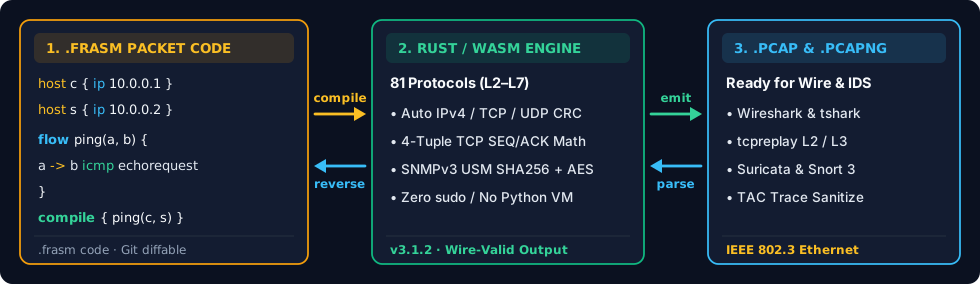
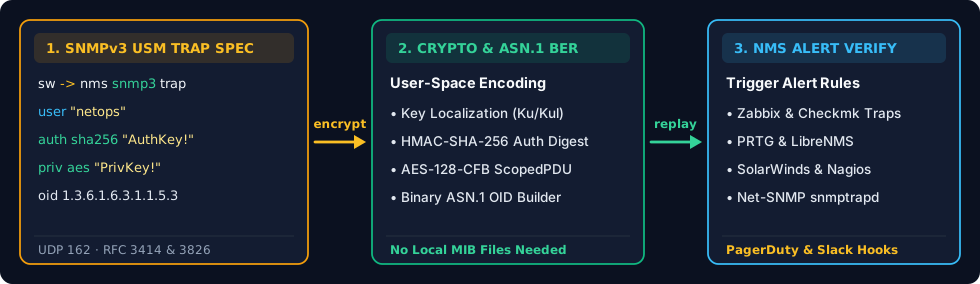
FrameAssembly two-way .frasm <-> .pcap compiler and reverse decompiler pipeline
Runs Locally in Your Tab · Offline Ready

Dropped .pcap files never leave your machine

The Browser Playground runs the Rust compiler directly inside your browser tab via WebAssembly — nothing gets uploaded anywhere. Prefer your own editor? Install the single CLI binary or the VS Code extension for live packet previews and instant keyword typo fixes.

Rust crate & npm WASM package (Cargo, Docs.rs, npm)

Generating captures inside automated tests? Grab frameassembly on Crates.io (API docs on Docs.rs) or frameassembly-wasm on npm.

Next on the Workbench

Shared topology imports across .frasm files

Today every .frasm file is self-contained. Next up is importing shared host and flow definitions so a whole folder of captures can reuse the same lab topology. Missing a protocol or modifier you need? Send a note.

Swap .frasm Recipes on GitHub